A curated catalog
Import your suppliers' product listings, review changes and approve each product. Send it to Shopify as a draft when it's ready.
See how publishing works (in Spanish)FOR STORES THAT BRING BRANDS TOGETHER
Give every brand its own space. Bring catalogs together, coordinate orders and track sales from a single store.
The app has been submitted for Shopify review. Get to know it in a demo.
 Casa OlivoHome
 Atelier TerraCeramics
 Estudio NorteLighting
You decide what gets published.
LESS BACK AND FORTH
Building a marketplace on Shopify also means organizing the day to day. Atlas connects your store's work with your brands', from the first product listing to the sales report.
Import your suppliers' product listings, review changes and approve each product. Send it to Shopify as a draft when it's ready.
See how publishing works (in Spanish)Invite your brands to a portal with email and password. They can check their catalog, orders and sales without accessing your Shopify admin.
Go to the brand portalCheck sales, commissions, held funds and balances by brand. Filter by date and download a CSV to keep working in Excel.
Explore the reports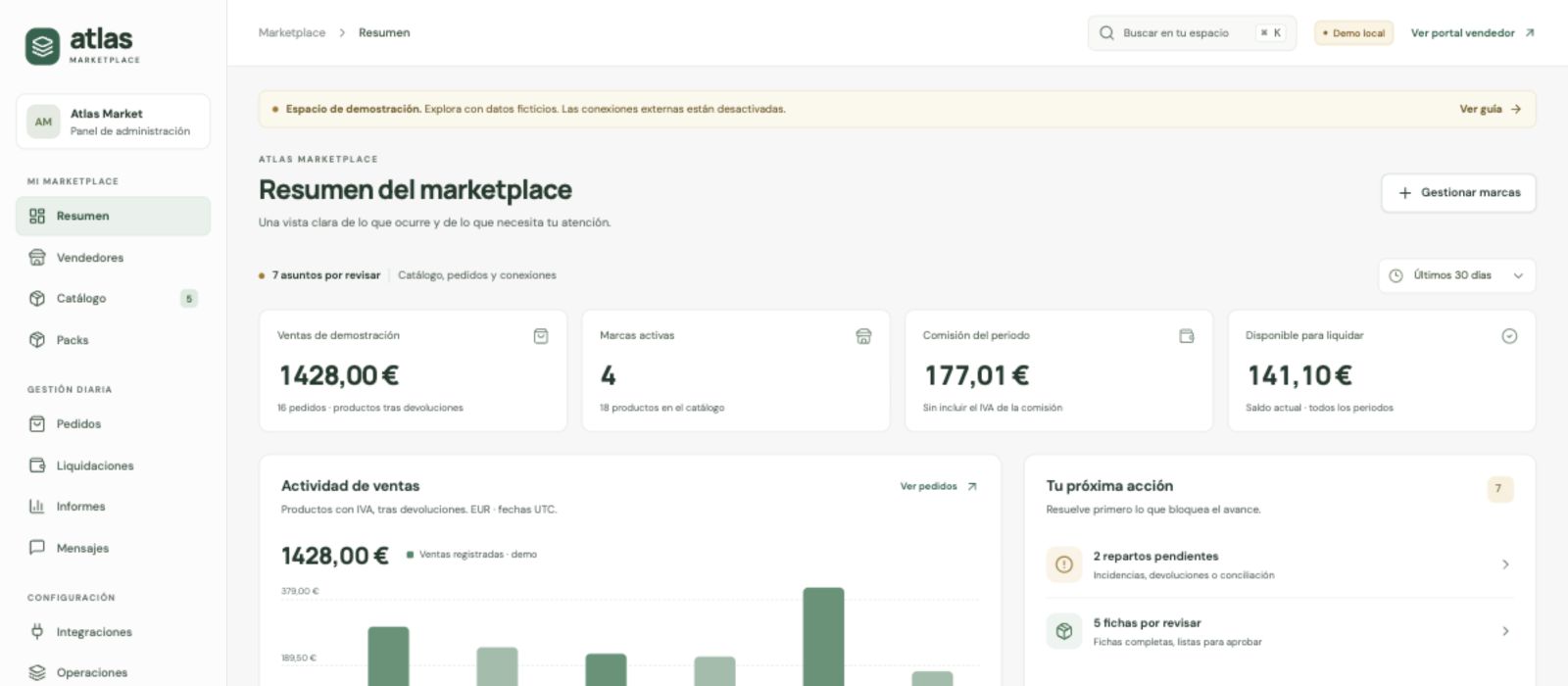
 BRAND PORTAL
Welcome, Atelier Terra
My storesChoose where you want to work today.A PORTAL FOR YOUR BRANDS
Your team runs the store. Brands log in to their own portal to see what concerns them and keep the conversation going with you.
FROM CATALOG TO SALE
Your store is the one selling to the customer. Atlas helps you manage the collaboration with several brands or suppliers within that model.
Set up profiles, permissions and commissions. Invite each brand to its portal.
Import by CSV or from a supported source. Review, approve and send product listings to Shopify.
See each brand's share and follow the status of its items and deliveries.
Check sales, returns and held funds before preparing payouts.
One shopping experience, in your store. Your customers pay at Shopify checkout. The relationship with suppliers is managed from Atlas.
THIS IS ATLAS MARKETPLACE
A tour of the catalog, orders, balances and the brand portal.
Video in English · subtitles available ·ROOM TO GROW
The same tools on every plan. The difference is how many active brands you need to manage.
19USD
every 30 days
Up to 5 active brands
49USD
every 30 days
Up to 25 active brands
99USD
every 30 days
Unlimited active brands
Installation available once Shopify approves the app. Subscription billed through Shopify, in USD. Applicable taxes depend on billing. Sales and payouts in EUR. External integrations require their own account and may have additional costs.
BEFORE YOU TAKE THE STEP
Does your project have something particular? We'll look at it with you.
Talk to AtlasIt's a store that brings products from different brands together in one catalog. With Atlas Marketplace, the store sells to the buyer through Shopify checkout and coordinates the collaboration with its brands or suppliers: catalog, orders, commissions and payouts.
No. Each brand receives an invitation from the store, activates its access and logs in to the portal with its email and password. From there it can check the information and operations that concern it, without entering the Shopify admin.
Yes. The Mis tiendas (My stores) section brings together the logins the brand has verified. If it uses a different password for another store, it can add that login. Orders, sales and permissions for each store are kept separate.
Yes. Reports can be filtered by date and downloaded as CSV, compatible with Excel and other spreadsheets. Sales and payout figures are managed in euros. The download is manual; no automatic daily email is offered.
The store reviews and approves each product listing in Atlas. It can then send it to Shopify as a draft and publish it from Shopify after checking stock, taxes, shipping and sales channels. Importing, approving and publishing are separate steps.
The buyer pays the store at Shopify checkout. Atlas helps you check commissions, held funds and balances by brand to prepare payouts. How suppliers are paid depends on the store's setup and payment methods; Atlas does not automatically split the Shopify Payments balance.
The full interface is available in Spanish. Promotional materials, including this page, also come in other languages; that does not mean the app interface has been translated into those languages.
The app has been submitted for Shopify review. You can request a demo and check whether it fits your store. Once approved, installation and plan subscription will be handled through Shopify.
YOUR NEXT CHAPTER
Tell us about your store and we'll show you how to organize it with Atlas Marketplace.
We reply in Spanish and English.